
v0.2.0 · macOS · Apple Silicon

Practice the interview out loud. Then run one for someone else.

A local-first interview studio on your Mac. Rehearse behavioral, system design, and coding rounds out loud with an AI interviewer that coaches what you actually said. Or take the interviewer’s chair with offline transcription, live follow-ups, and a blind audit of your own hire call. Your audio never leaves the machine.

Install in one line

curl -fsSL https://raw.githubusercontent.com/manthedan/mockery/main/install.sh | sh

Free and MIT licensed. Transcript-only needs no key; AI rounds connect to your CLI, local model, or API key. Other ways to install · Source on GitHub

A solo AI interviewer with supportive coaching

Two modes, one studio

Sit on either side of the table.

AI Mock Practice

You’re the candidate.

An AI interviewer tuned to your redacted resume and target role. It listens, probes, and coaches every round.

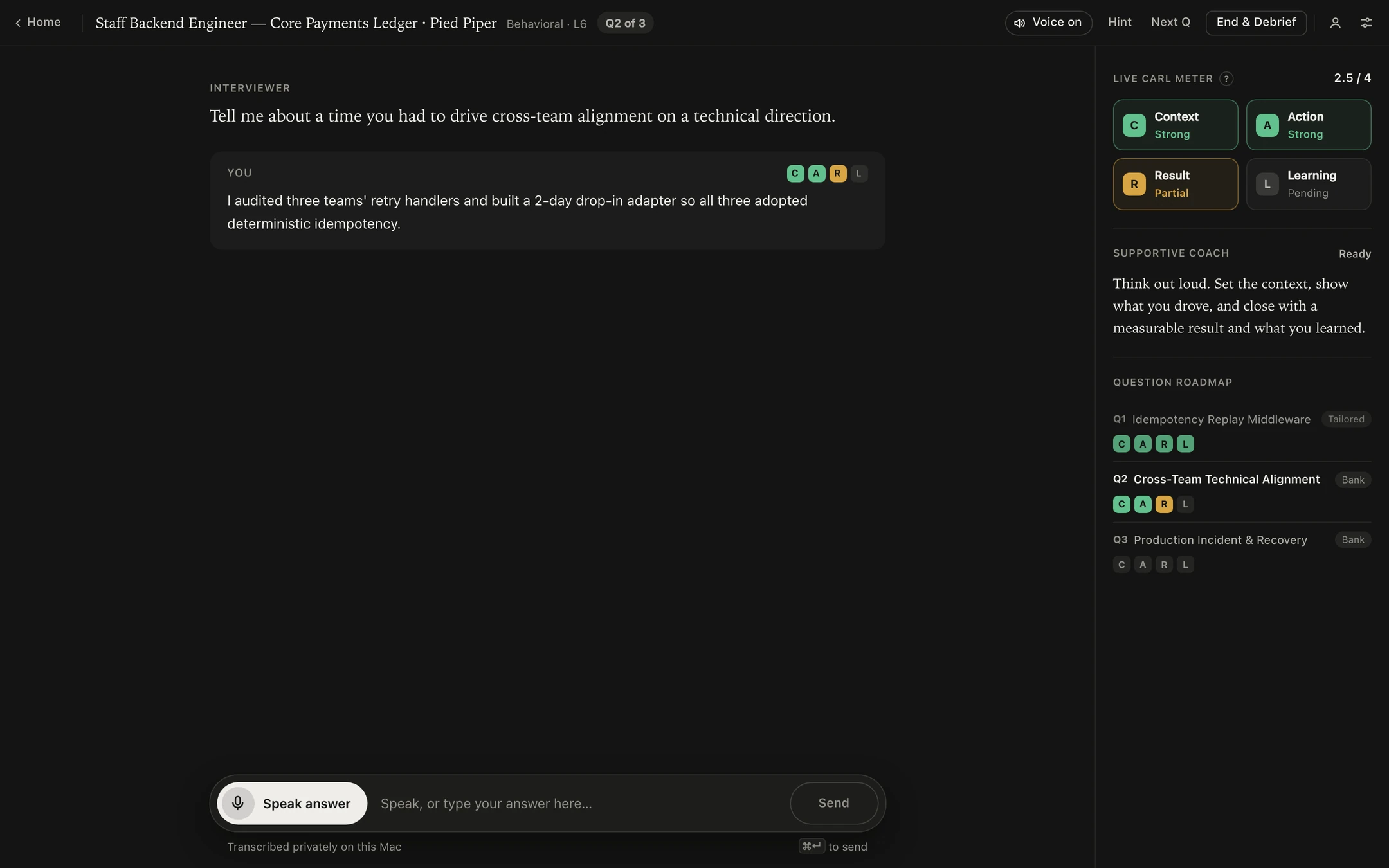
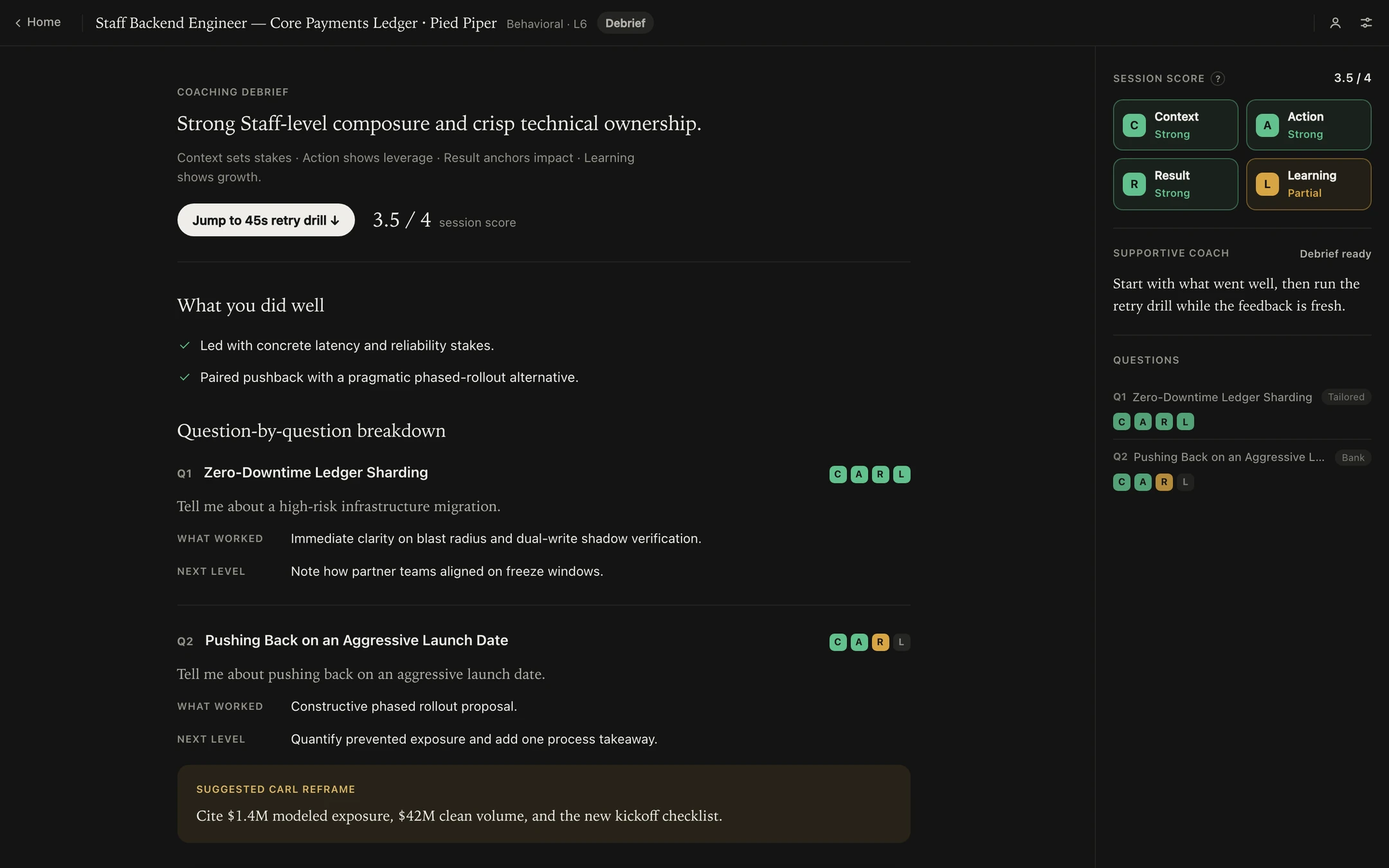
Voice-first behavioral
Answer out loud to a local neural voice (Kokoro or Phonon) while a live CARL meter tracks Context, Action, Result, and Learning.
Debrief and 45-second retry
Get a question-by-question breakdown and reframe, then re-deliver your weakest answer in one timed 45-second drill while it’s fresh.
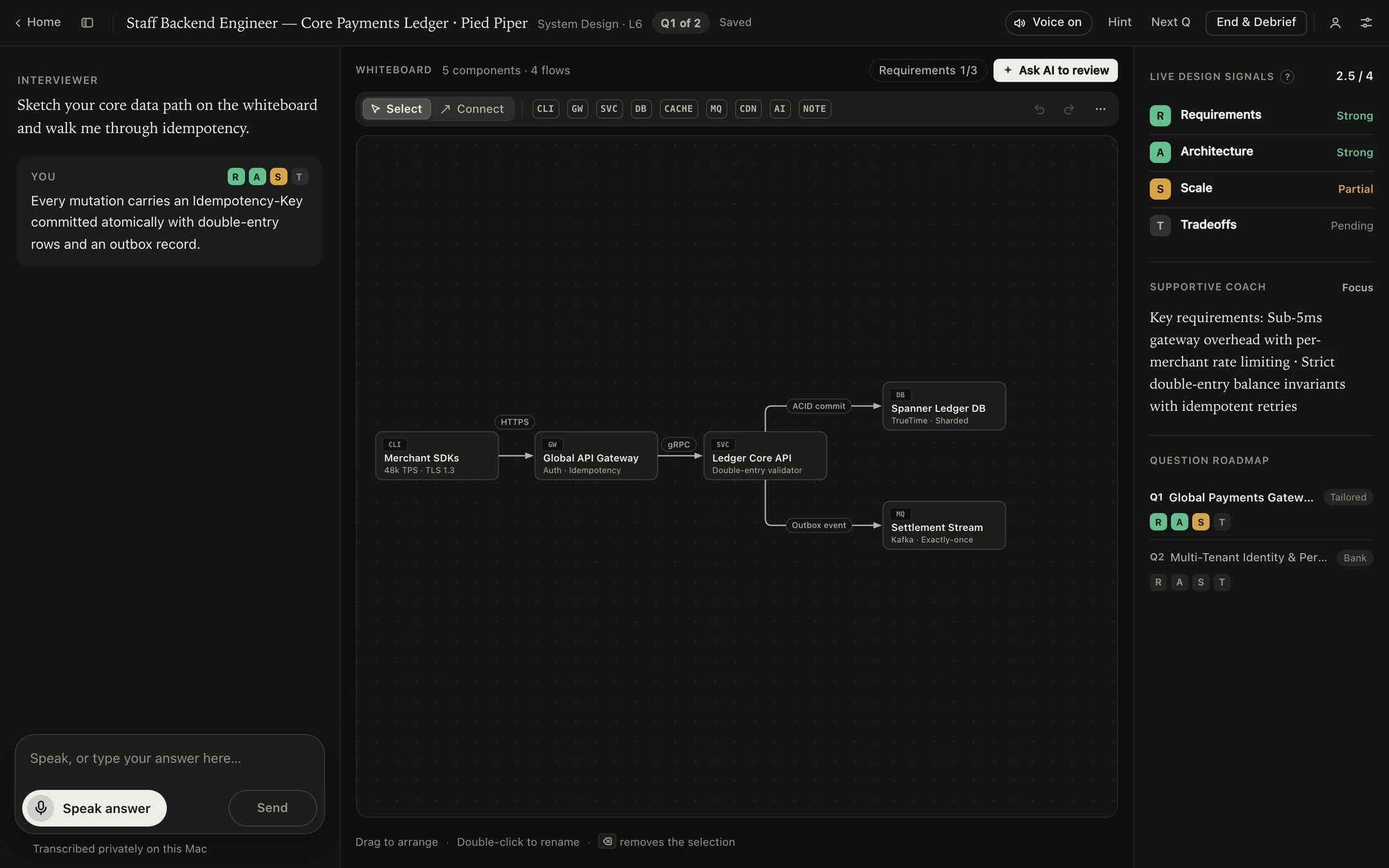
System design whiteboard
Sketch services, caches, queues, and stores on an SVG canvas. The interviewer reads your diagram and probes what you actually drew.
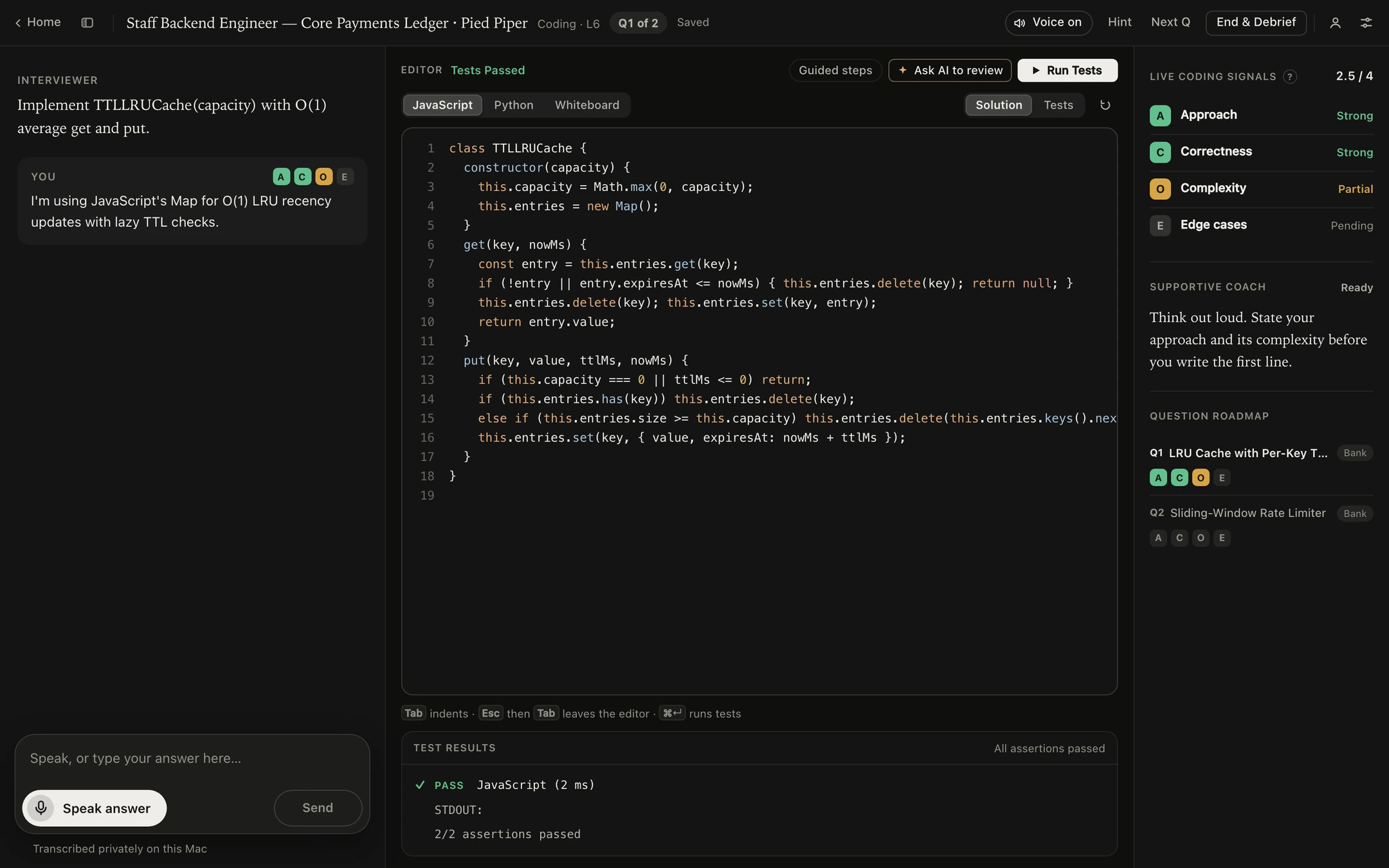
Coding studio
Write and run real tests in sandboxed Web Workers—JavaScript built in, Python offline via a local Pyodide pack.
Live Interviewer Copilot

You’re the interviewer.

A quiet second pair of ears when you run a mock for a friend or teammate, on Google Meet or across a desk.

Offline speech-to-text
Parakeet on MLX transcribes locally on Apple Silicon. Drafts stream in ~50 ms and lock in with full-sentence context.
Two voices, kept apart
WeSpeaker acoustic diarization splits two speakers on a single mic. On Google Meet, your mic and call tab capture on separate tracks.
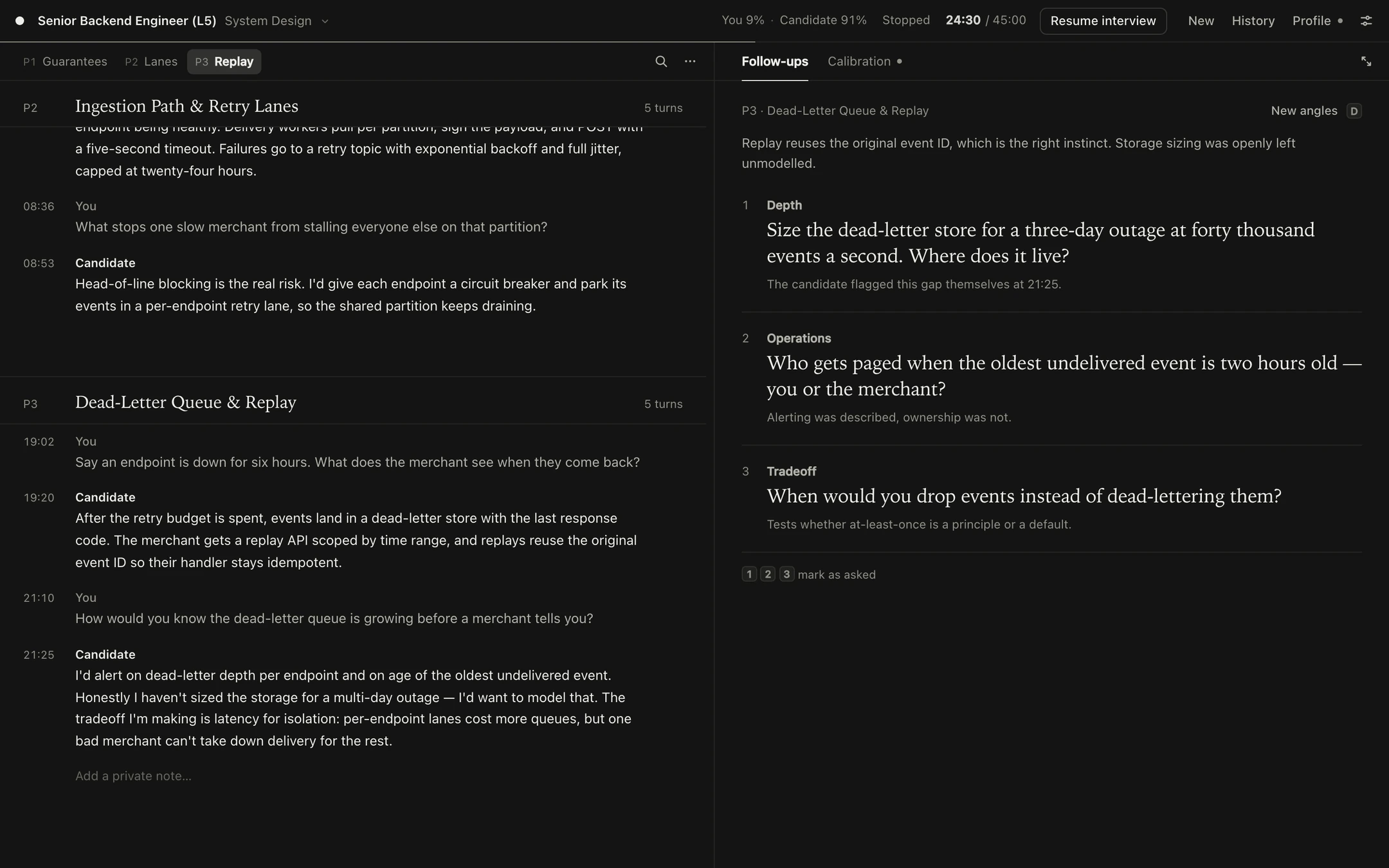
Live follow-up probes
Speculatively pre-drafted as they talk. Hit D for three grounded follow-ups, and 1–3 to mark them asked.
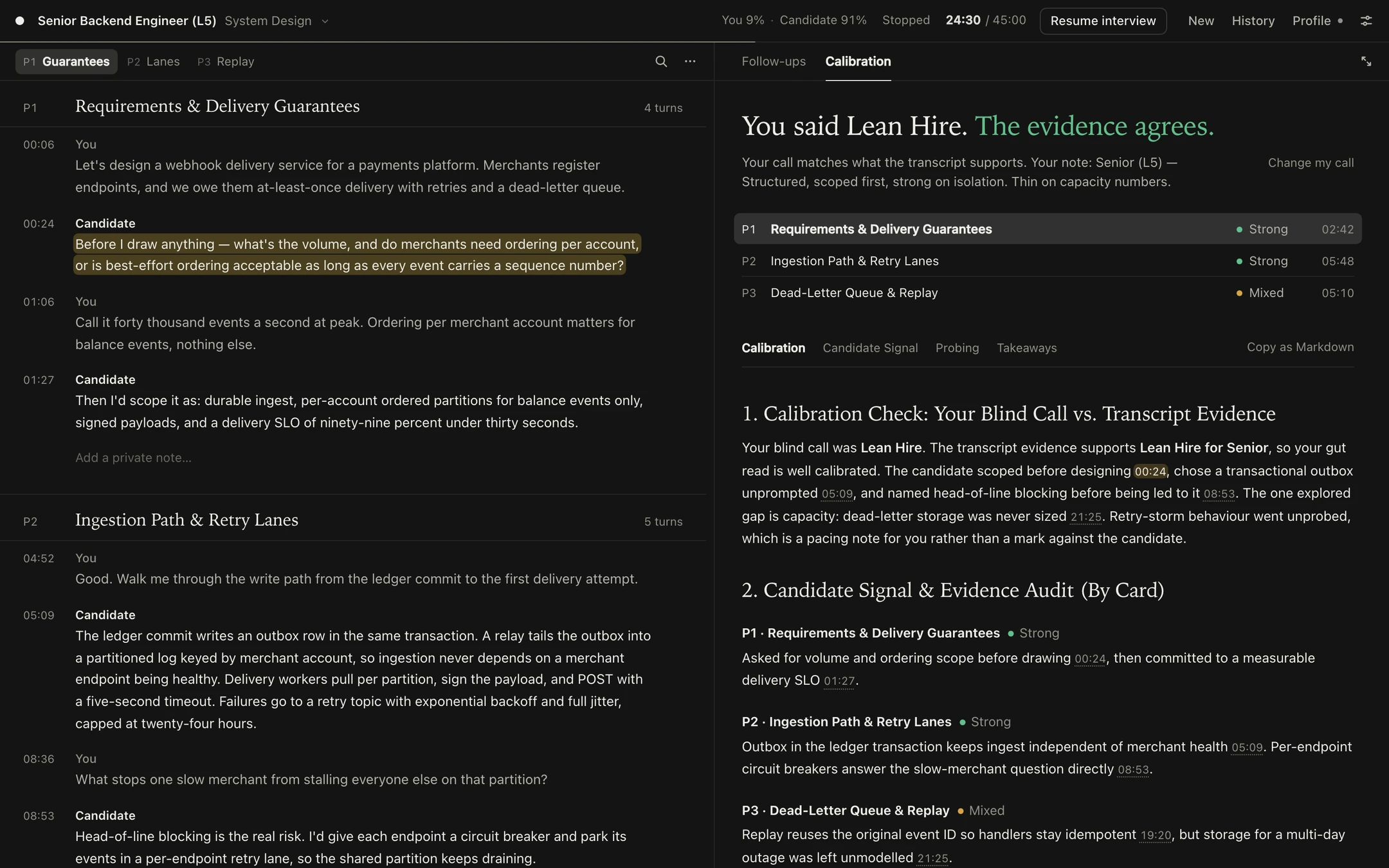
Blind calibration
Commit to your own hire call before seeing the AI’s take. Then inspect an evidence audit cited to the exact timestamp.

Studio showcase

Look inside before you install.

Unretouched v0.2 screens captured straight from the running app, populated with synthetic demo data.

Say it out loud. See what landed.

Speak your answer and watch the CARL meter track Context, Action, Result, and Learning as you go. End the round for a question-by-question debrief, a concrete reframe, and one 45-second retry drill on the story that needs it most.

Draw the system while you talk.

Place clients, gateways, services, caches, stores, and queues on an SVG dot-grid canvas and wire them with labeled flows. The interviewer inspects your diagram, tracks requirements, and probes the trade-offs in what you actually drew.

System design whiteboard with five connected components, from Merchant SDKs through an API gateway and ledger service to a database and a settlement stream.

Write it, run it, explain it.

Run real test suites in isolated Web Workers—JavaScript out of the box, Python completely offline through a local Pyodide pack. Your editor, test output, and interviewer stay right beside each other.

Coding studio with a JavaScript LRU cache solution, JavaScript and Python tabs, a Run Tests button and a passing test result.

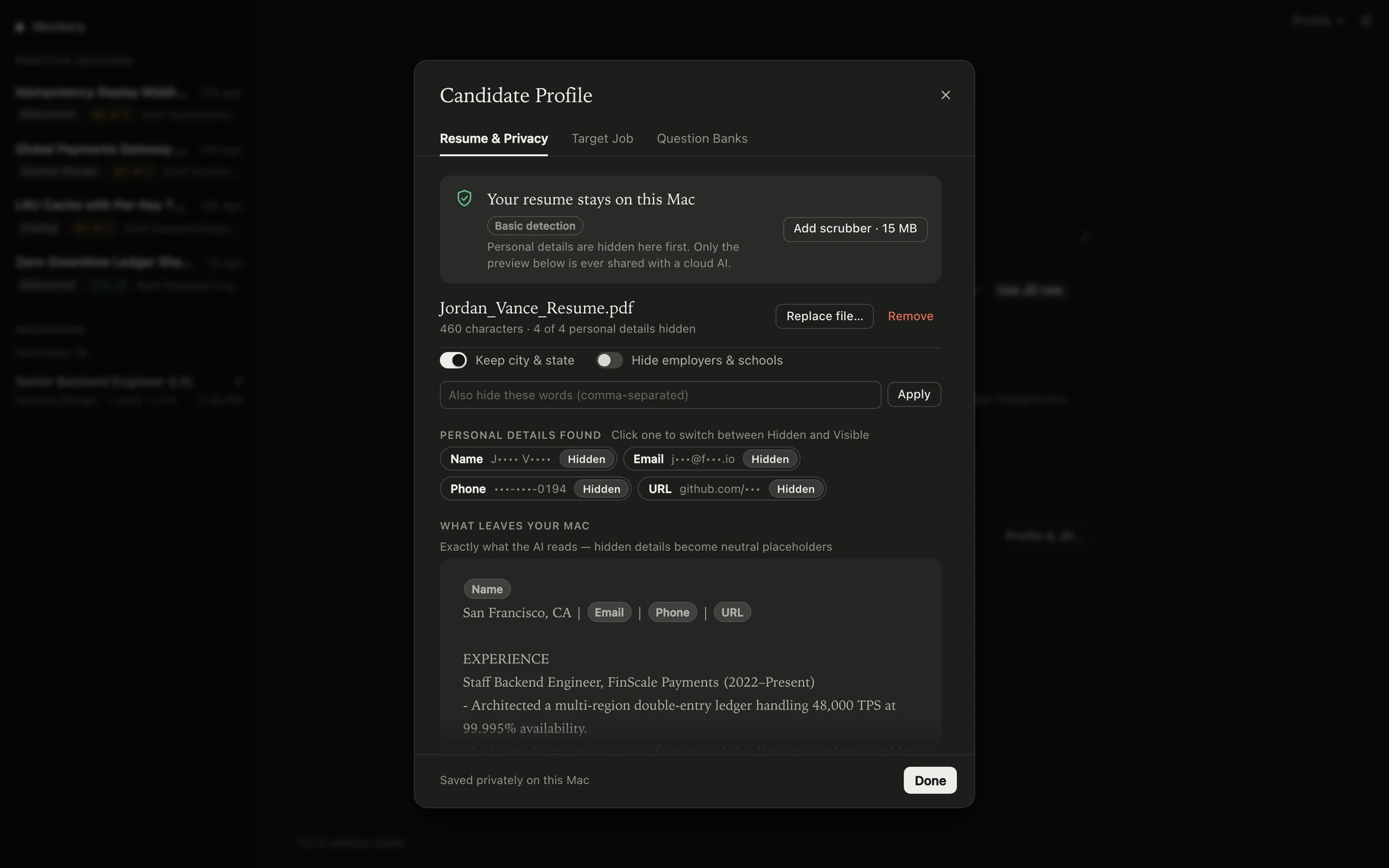
See exactly what leaves your Mac.

Rampart detects names, employers, emails, phone numbers, and links right on your Mac, swapping them for neutral placeholders. Flip any item between Hidden and Visible in one click—the preview on screen is the only version a cloud model ever sees.

Candidate profile dialog: a demo resume with four personal details hidden, and a preview of the redacted text that is shared with a cloud model.

Three follow-ups, the moment you need them.

As the candidate speaks, Mockery pre-drafts three grounded follow-ups in the background so they’re ready the instant you ask. When the round wraps, lock in your own verdict first, then inspect a blind calibration audit with every claim cited to its exact timestamp.

Local-first, on Apple Silicon

What runs where.

Listening, speaking, PII redaction, and code execution all run locally on your Mac. The only thing that can ever leave is text—and only to a model you chose.

On your Mac

Speech-to-text
Parakeet TDT 0.6B on MLX. Downloaded once (~600 MB), then 100% offline.
Speaker separation
WeSpeaker on CoreML. Acoustic diarization for two voices on a single mic.
Interviewer voice
Kokoro or Phonon. Optional local neural voice packs; built-in macOS speech works out of the box.
Resume redaction
Rampart. Optional 15 MB on-device scrubber for names, employers, and contacts. Basic detection is built in.
Code runner
Sandboxed Web Workers. JavaScript built in; Python offline via a local Pyodide pack.
Your sessions
Plain files on disk. Transcripts in Application Support, API keys locked in a 0600 file.

The model you bring

Optional. Powers AI practice, live probes, and calibration.

  • oMLX, Ollama or LM StudioStays 100% on your Mac. Nothing leaves at all.
  • Transcript-onlyNo model or key needed. Local transcript, notes, and export.
  • A CLI you already useClaude Code, Codex, Gemini, Agy, or Pi—on your existing plan.
  • Your own API keyGemini, Anthropic, OpenAI, DeepSeek, or OpenRouter.

stays local sends text to that provider

  • Loopback by default. Mockery binds strictly to 127.0.0.1 and verifies same-origin requests—nothing else on your network can touch it.
  • Token-gated on LAN. Expose the studio on your local network intentionally and Mockery enforces a random access token.
  • Redacted before upload. Cloud models only ever receive the scrubbed resume preview you explicitly approved.

Bring your own model

Use what you already have.

Transcript-only mode—offline transcription, diarization, phase cards, talk ratios, and Markdown export—needs zero API keys. Connect a model whenever you want AI Mock Practice, follow-up probes, coaching, and calibration.

OptionCost and sign-inBest for
Local CLIs claude · codex · gemini · agy · pi Your existing subscription. No API key. One-click connect—auto-detected if installed on your Mac.
Google Gemini API Free tier via Google AI Studio. Fastest cloud setup with no credit card.
Anthropic, OpenAI, DeepSeek, OpenRouter Bring your own API key. Running your favorite frontier or low-cost model.
oMLX, Ollama, LM Studio Free and fully offline. Air-gapped local inference. 16 GB+ Apple Silicon Mac recommended.
Transcript-only Free. Zero setup. Pure offline transcription, notes, and Markdown export.

Install

Up and running in a minute.

Requires a Mac with Apple Silicon. Use Google Chrome if you want dual-track Google Meet tab capture.

One-line installer

Installs Mockery.app straight into Applications.

curl -fsSL https://raw.githubusercontent.com/manthedan/mockery/main/install.sh | sh
  1. Paste the command into Terminal.
  2. Launch Mockery from Applications or Spotlight. It lives in your menu bar and opens the studio at 127.0.0.1:8765.
  3. First launch downloads the offline Parakeet speech engine once. Pick an auto-detected CLI, local model, or API key—or skip straight to transcript-only.

Run from source

Prefer a git checkout? Run it with uv.

git clone https://github.com/manthedan/mockery.git cd mockery uv run mockery

View Mockery on GitHub